Mojini V3 is an online platform created by the Revenue Department of Karnataka. It helps people to get land-related information easily from their phone or computer. And you can check land sketches, track survey requests, and see details related to your land. These sketches show the exact boundaries of the land, and it’s useful for buying, selling, or solving land issues.
Mojini is mainly used for managing land survey applications, including requests for phodi, durasthi, and other survey services. It helps to reduce manual work and improve accuracy in land measurements and record updates. With better online tracking and status updates.
Overall, Mojini V3 is a big step toward digital land administration in Karnataka. It saves time, reduces errors, and gives more transparency to the land survey system.
To Get The Status Of Application By Entering The Application Number.
To Get The Status Of Allotment By Entering The Application Number.
To View IIE Sketch, Alienation & Phodi Sketch.
Access detailed revenue maps and land records information.
Management Information System reports and analytics.
Submit requests for survey documents and related services.
Access and view your survey documents online.
What is Mojini V3?
This digital platform is part of the government’s effort to make land services faster, more transparent, and easier to use. Mojini V3 is connected to the Bhoomi project, its stores Karnataka’s land records online.
With the app, users can:
- Get survey sketches showing land boundaries
- Track land conversion or mutation applications
- View land status using the survey number
This website is simple to use and works on both computers and mobile phones. And saves time by reducing the need to visit government offices for basic land-related services. It is mainly useful for landowners, farmers, property buyers, and anyone dealing with land in Karnataka.
Mojini V3 Key Features
- Application Tracking: Users can check the status of their land survey or mutation applications online. It helps to reduce delays and give more clarity to the process.
- Land Sketch Access: Access different types of land sketches, including:
- 11E Sketch – Shows clear land boundaries
- Alienation Sketch – Displays government-allotted lands
- Phodi Sketch – Divides land shared under the same survey number
- Village Maps: Users can view digital village maps to understand the layout of plots within a region.
- Dispute Reports: Access the details of land disputes and objections recorded in the MIS (Management Information System). This helps users stay informed before buying or selling land.
- Policy Updates: This portal also shares recent updates and circulars issued by the Revenue Department and helping users stay aware of current land laws and rules.
How to Download and Use the Mojini V3 App ?
The Mojini app is available for both Android and iOS users:
- Android users can download it from the Google Play Store by searching for “Mojini V3.”
- iPhone users can find the app on the Apple App Store.
The app supports both Kannada and English, its easier for local users to navigate in their preferred language.
How to Use the App
Once installed, the app users can:
- Check land sketch (11E, Phodi, Alienation)
- Track survey or mutation application status
- View village maps
- Check for dispute reports
- Get updates on land policies
To use any feature, open the app and enter your district, taluk, hobli, village, and survey number. The system will then show the latest data linked to your land.
How to Log in Mojini V3 Portal ?
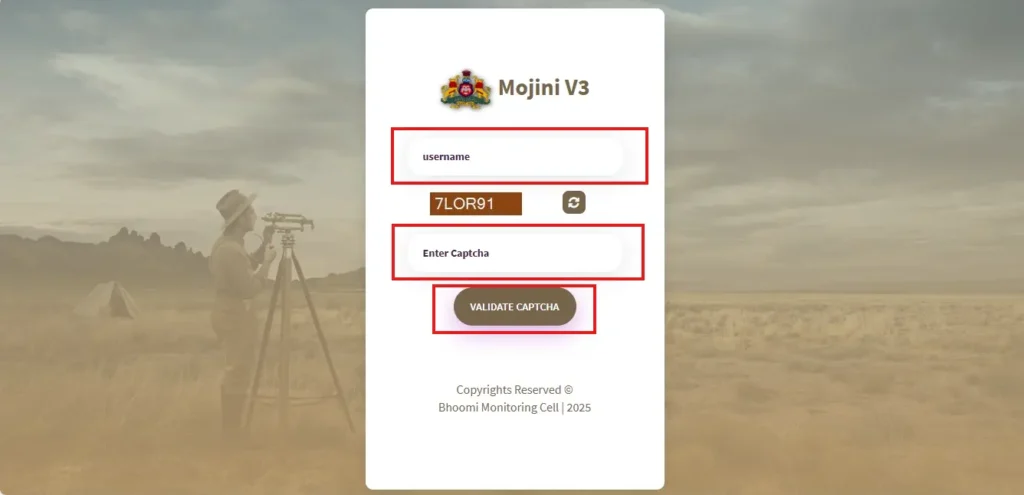
- Enter Your User ID and Password.
- Complete the Captcha.
- Click on the Login Button.
For general users, most services like viewing land sketches, tracking survey applications, or checking dispute reports can be accessed without logging in. You just need your survey number, district, and village details.
How to Check Mojini V3 Application Status ?
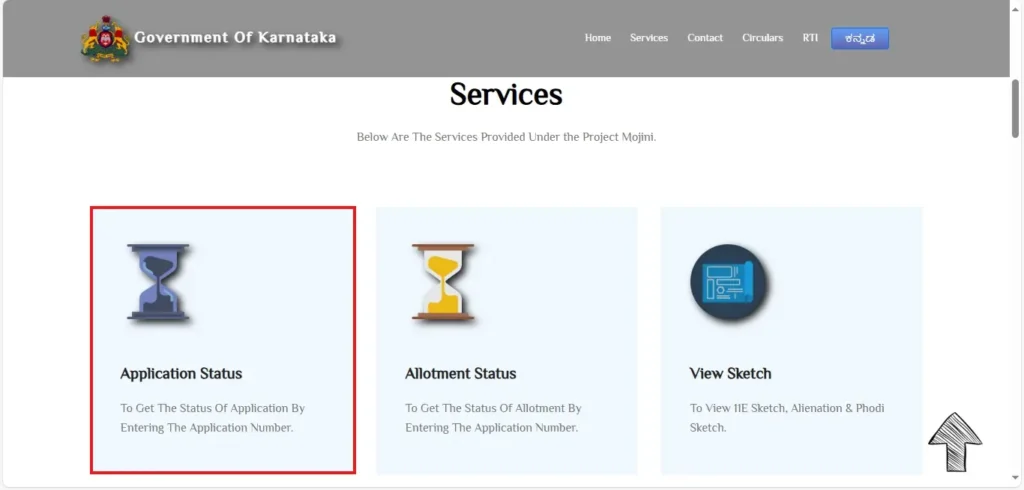
- Find the “Application Status” Option.
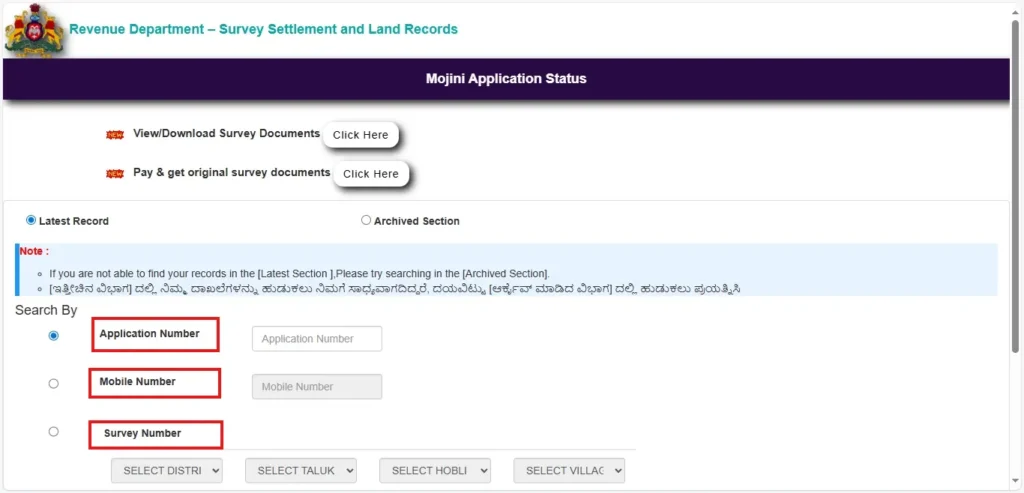
- Choose Your Preferred Search Option
- Application Number
- Mobile Number
- Survey Number
- Select any one method and enter the correct details in the given field.
- Click on “Check Status”
11E Sketch application status
An 11E Sketch shows the survey-based boundaries of a specific land and is accepted as a verified document during legal and registration processes.
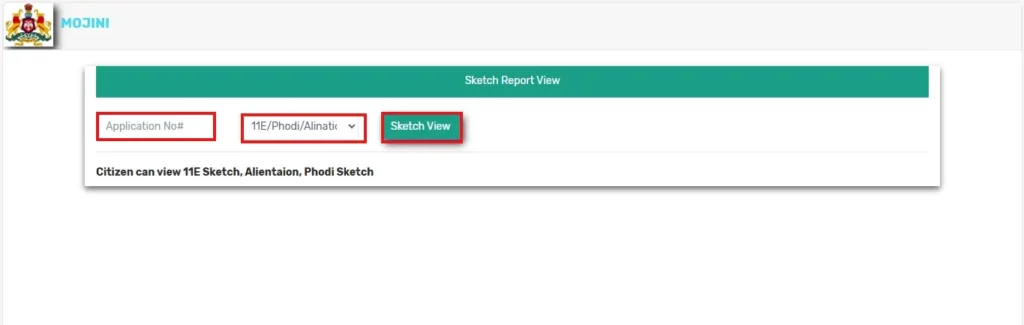
- Enter Your Application Number.
- Select Sketch Type.
- Click on “Sketch View.
How to View Revenue Maps
You can easily view or download the official village revenue map online. These maps show how land is divided in a village, including survey numbers, plot boundaries, and neighboring areas. They are useful for landowners, buyers, and anyone needing to verify land location or layout.
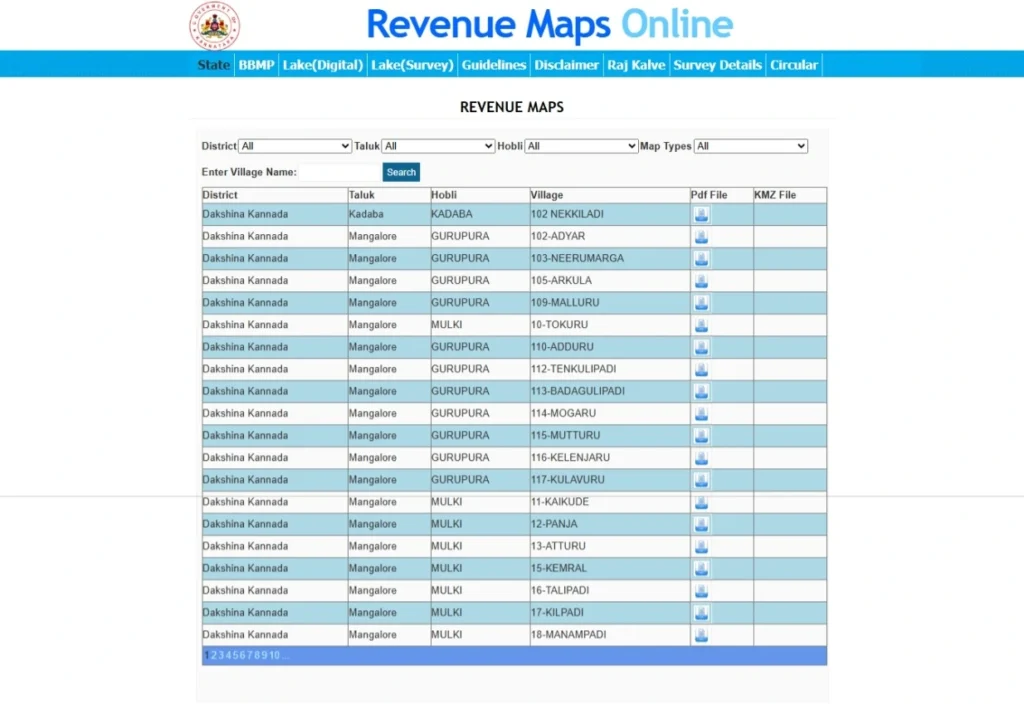
- You can browse manually by selecting your district > taluk > village.
- Once your village is selected, a PDF version of the map will be available. You can view it directly or click to download and save it.
How to Apply Survey Documents
Currently, you can request the following survey documents:
- Atlas – Full map of the village or survey area.
- Survey Pakka Book – Official notes taken during land surveys.
- Tippan – Land measurements and remarks by survey officials.
- Akarband – Details about land type, usage, and ownership.
- FMB (Field Measurement Book) – Technical sketch of land boundaries.
- Survey Prati Book – Duplicate record of land survey details.
Steps to Apply for Survey Documents
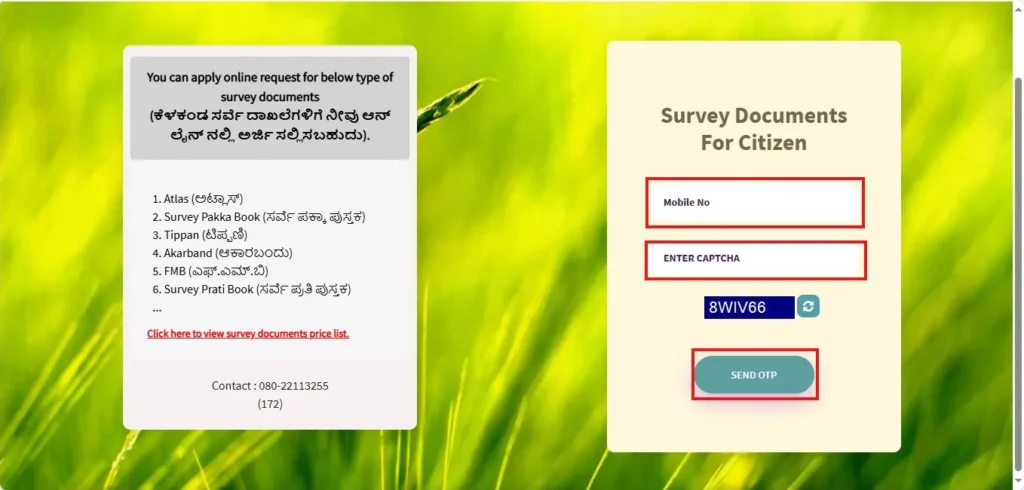
- Enter Your Mobile Number.
- Verify OTP.
- Choose the type of survey document you need.
- Fill in the required details like district, taluk, hobli, village, survey number, etc.
- Pay the application fee online and submit the form.
How to View Survey Documents
- Go to the Official Survey Document Login Page.
- Enter Your Login Credentials.
- Access Your Survey Documents.
Frequently Asked Questions (FAQs)
1. How Long Does Mojini V3 Survey Take?
The survey process usually takes a few weeks to a few months, depending on the type of application and workload at the survey office. Delays may occur due to document verification, land disputes, or administrative procedures.
2. Which survey documents can I apply for online?
You can request the following:
- Atlas
- Survey Pakka Book
- Tippan
- Akarband
- FMB (Field Measurement Book)
- Survey Prati Book
3. What should I do if I forgot my Mojini User ID or Password?
Call 08022221038 and give the required details they asked or access the customer support email sslrmojini.pmu@gmail.com.
4. Is there any fee for applying for survey documents?
Yes, each document type has a different fee. The fee amount will be shown during the application process, and payment must be made online.
5. What is 11E Sketch in Karnataka?
It is an official land survey sketch issued after subdivision (phodi) of land. It shows the new boundaries, measurements, and survey numbers created after land division. The 11E sketch is important for mutation, registration, and updating RTC records.